Long editing made easy
Write long texts in English in shorter time: rephrase, correct, and polishing your essay, article, or paper while staying true to your unique writing style

The text editor that stands out
International Business Times
Grammar check for all texts
Covering all your editing needs
Become the essay master you can be! Write in English at your best while staying true to your personal style
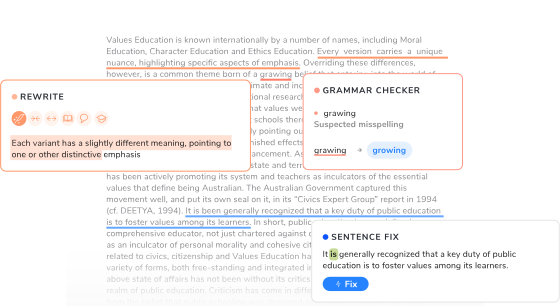
Fix your sentence
Search in context
Rewrite your text
Edit longer texts
Detect AI

I have been constantly using it in both editing and translation. Ever since, I suggest it to my translators at ProSciEditing.
Justyna Jupowicz-Kozak
CEO of Professional Science Editing for Scientists @ prosciediting.comCool things about Ludwig
Reliable
The best sources in terms of quality, reputation, and variety. Search, fix, and rewrite like a pro
No ads
Write without any interruption, or flickering distraction everywhere on Ludwig’s platform
Ethical
Write while staying true to intellectual property and accountability, with our ethical approach to sources and AI
Best value
Our tools are free to use after the signup. Also, our Premium plan has the best price for value around

Frequently Asked Questions
What kind of texts can I edit?
+
Every kind of text you can imagine: from precise sentences to entire essays or articles.
Edit more articles at once and check for typos or mistakes in no time. Get fast rephrasing or shortening for paragraphs you couldn’t write shorter, and optimize the information delivered with slick, straightforward English writing.
Work on your essay: check grammar, spelling, or vocabulary mistakes, change the tone of too-informal phrases, and generate titles for your paragraphs
Polish your academic paper or your final thesis: nothing is more reliable than a tool designed for academic students and researchers (like Ludwig!) Get text extensions or switch to a more efficient academic tone with editor’s AI tools.
This is what makes Editor the most handy tool of all! You can paste your entire essay or long-form text into it and get it spell-checked and grammar-checked in a click.
Get all the detected misspells and errors in a list, and choose which suggestions to keep and which to discard. Editor allows you to enhance your text with AI, keeping full control of the changes.
Need a quick review of a sentence or a small paragraph? Perfect: editor includes a Grammar Check and a rewrite tool to make your quick fix faster.
What are the AI tools inside Editor?
+
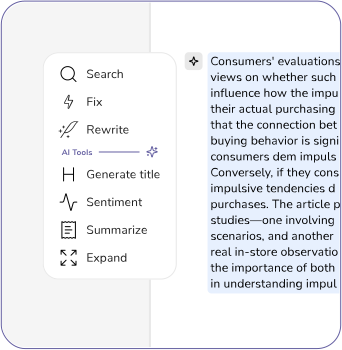
In addition to having Search, Grammar Check, and Rewrite integrated in the tool, Editor also offers generative AI tools to make your writing experience complete and seamless.
Generate title: select the paragraph of your essay you want to give a title to, and click the star button on the left. In no time, the tool will provide you with a 100% accurate title. Or, generate an essay title that stands out.
Sentiment: this tool can analyze an entire paragraph and tell you in a couple of words what’s the main sentiment (positive or negative) towards the main subject.
Summarize: sum up a phrase or a paragraph as many times as you like, and…
Expand: enjoy the reward of seeing your text gaining that extra line you needed, in just a click.
Why should I register to Ludwig?
+
Sign up and get daily Editor checks for free, to keep writing like a pro and get the best out of the most reliable essay checker on the market.
Once you register, you get all the tools that Ludwig Premium users have (only with fewer requests per day, of course).
Signing up for Ludwig’s tools is the best choice you can think of when you need to stick to your core ideas while getting a cool form that fits from the most formal situations to the most informal ones.
Ludwig is not just Editor! Try Search in context, to make sure your idioms make sense, or Grammar Check to give a quick polish to your essay’s grammar and form.
Sentence Rewrite can make your sentences shorter, larger, formal or academic in no time, Editor makes entire texts shine with style and corrects every single typo with coherence.
Not enough? We also have an AI Detector, a Library, and Ask PDF: sign up and try all these AI tools for free. And if you really like them, we have a Premium and Premium Plus plan to get the best out of your essay, academic paper, article, or social media content.
Can I rewrite sentences in Editor?
+
Of course! This is the most beloved feature by students and scholars. Turn your phrase into more academic, more formal (yes, they are two different things!), more informal, and choose even the length of your phrase with Editor.
Academic tone: are you a student who just thought of the perfect phrase, but you can’t turn it into one similar to it that fits your academic paper? Try rewriting in ‘Academic’ style in the editor and be surprised by the array of choices given.
Formal tone: write your email with confidence without thinking of pleasing you best customer: let Ludwig do the job! Put everything on Editor and click ‘Formal’ to feel like a modern Shakespeare, and persuade even the most difficult reader with your article.
Informal tone: are you looking to write that funny, catchy phrase to engage your audience on Instagram or other social media, but you really don’t feel like being creative? Do you look for that article checker that can give your text that special twist of style? Rewrite’ ‘informal’ button is so cool you might as well become friends!
Does Editor find grammar mistakes?
+
Of course, you can use Editor as a powerful grammar checker. And it’s not the only tool on Ludwig that does that.
With Ludwig grammar tools like Editor and Grammar Check, you can seamlessly check and improve your English.
Grammar Check is ideal for shorter texts, helping you quickly spot and correct grammatical errors, typos, and awkward phrasing in sentences up to 260 characters.
Editor combines grammar checking, rewriting, and paraphrasing capabilities for longer pieces such as essays, articles, or research papers. It’s perfect for refining your English the Ludwig way, and ensuring your texts are professional and well-crafted.